Showing posts with label Facebook. Show all posts

Zuckerberg Can Lose Facebook:

0 comments
Facebook can terminate services of its chief Mark Zuckerberg at any time for any reason, or even without a reason, but the social networking giant’s founder and CEO also enjoys similar exit rights.
As per Facebook’s employment agreement with Zuckerberg, his tenure at the social networking giant would be on an ‘at will’ basis, meaning his job can be terminated ‘at any time for any reason or no reason’, either by him or by the company.
The company has disclosed Zuckerberg’s employment agreement, revised late last month, as part of an amended registration document for its upcoming IPO (Initial Public Offer) filed with the US market regulator Securities and Exchange Commission (SEC).
The global leader in social networking space is planning for a USD five billion dollar IPO, which could push Zuckerberg and a few others into the league of billionaires, based on the valuation of their shareholding in the company.
While the job duties, title, compensation and benefits, as well as the company’s personnel policies and procedures, might change from time to time, the ‘at will’ nature of Zuckerberg’s employment can be changed only after a written agreement approved by the Facebook board.
The employment agreement of Facebook’s Chief Operating Officer (COO) Sheryl Sandberg also has an ‘at-will’ clause.
Sandberg’s agreement also provides for reimbursement of her business expenses by Facebook, although that of Zuckerberg has no such clause.
One of the clauses also bars Zuckerberg from creating a rival to Facebook.
Reade more >>

Shoot on laptof, for facebook.

0 comments
Tommy Jordan, from North Carolina, posted the video entitled, "Facebook Parenting: For the troubled teen" on YouTube on Wednesday.
 Today, it has passed the four million view count.
Mr Jordan went public with the clip after daughter Hannah posted on Facebook a profanity-laced, open letter to her parents griping about what most 16-year-olds would complain about at that age - having to do chores and not having the latest gadgets bought for her.
In the video, Mr Jordan sits on a chair with a cigarette in hand and a printed-out copy of his daughter's posting in the other. He also has a .45 calibre holstered to his belt.
The angry dad starts off with a message to his daughter.
"Hannah, you were grounded for three months for doing something similar to this and I would've thought that with a father in IT for a living, you would have better sense than to do it again," he says.
He then reads his daughter's posting, entitled "To my parents."
After finishing his reading, Mr Jordan announces that he is "going to put a stop to this, and put a stop to it now." With that, he aims both the camera and his weapon at his daughter's laptop and opens fire.
"It's about to get a whole lot harder today. I'm gonna post this on your Facebook wall, so all those kids that thought it was cool for how rebellious you were can see what happens."


The video has caused a rift among those who viewed it over whether the punishment fit the crime.
After the video went viral, Mr Jordan was besieged by requests for interviews, but said he'd done enough talking.
"Never again in my entire life will I ever do anything that garnishes this much attention, both positive and negative. I really wished we'd been prepared or something," he wrote on his Facebook profile yesterday.
"Never again will I have the opportunity to speak to so many people about anything ... and instead I'm sitting here stupefied."
Reade more >>

50 Greatest Twitter Tips & Twitter Secrets

1 comments
Twitter is a micro-blogging service and it is very hot now. It allows users to send at most 140 characters to their followers. Twitter opens a new way to connect with other party in the community. It’s so successful because it’s simple and easy to create your own community.
I’ve been tweeting for quite some time now, mainly for personal learning, making new friends, and observing what communities are doing. Following are 50 greatest Twitter tips and Twitter secrets to move you towards a successful experience on Twitter.

  1. Pick a memorable username.
  2. One tweet one story.
  3. Try to follow back when people following you, you’ll get credits for your kind action.
  4. No puns for optimized headline.
  5. Focus on keywords for optimized headline.
  6. Don’t consolidate stories.
  7. Link directly to the story.
  8. No subheads.
  9. Don’t try to fill up 140 characters, keep it short to your point.
  10. The highest form of compliment on Twitter is the retweet. Share the love, it’s the gift that keeps on giving.
  11. Spend some time making a custom background.
  12. Don’t make your background look like some sort of advertisement, it turns people off.
  13. Speak your mind, be personal and be transparent!
  14. Tweet with photo with TwitPic.
  15. Be interesting, boring story turns people off.
  16. Be informative, now is the time to use Twitter to tell people about your business goals, your professional interests, to spread knowledge and offer customer support.
  17. Be interactive.
  18. Be considerate, people will feel it.
  19. Find a balance, there is no exact number of how many tweets per day.
  20. Be a observer, observer what communities are doing.
  21. Learn from Twitter user who has most followers.
  22. Upload a photo of yourself and show it in your Twitter profile, people love to know who they are chatting with.
  23. Try to tweet regularly so that people know you have an active presence.
  24. Try to not use Twitter as your own personal “this is what I’m doing” list.
  25. Try to add value to the conversation by sharing links.
  26. Mix some personal information so that people know you’re a human being and not just an online merchant pushing links.
  27. Thank people when they follow you on Twitter with a direct message.
  28. Start conversation with the “@” command, don’t just wait for people to talk to you.
  29. Ask questions. Twitter is great for getting opinions.
  30. Make sure to respond to people that ‘@’ or direct message you to show your respect.
  31. Make noise beyond the Twittosphere, this is only way to build a following is for people to know you’re there.
  32. Don’t worry about how many Twitter followers you have, if you become an active participant you will see your followers increase.
  33. Don’t spam anyone with anything.
  34. Promote your Twitter name in your email signature, business cards, websites, blogs. Don’t be afraid to mention Twitter offline either.
  35. If you see that people are talking about you (good or bad) on Twitter search, then join in the conversation!
  36. Don’t stalk or harass people on Twitter, if someone ignores you, just let it go.  The same goes for you, if people are stalking or harassing you, you can block them on twitter.
  37. Go mobile, there’re tons of Twitter apps for the iPhone and Blackberry.
  38. Try to keep your Twitter “following/follower” ratio balanced.
  39. Fill up your information in Twitter profile, people like to know who you are.
  40. Link to a website that’s relevant, preferably your blog or Facebook page.
  41. Be patient you won’t build relationships or feel the community spirit over night.
  42. Get a good desktop client with TweetDeck.
  43. Track your results and statistics with TwitterBurner.
  44. Make objectives about what you want to achieve by using Twitter, and stick to them.
  45. You don’t have to read every tweet.
  46. When promoting a blog post, ask a question or explain what’s coming next, instead of just dumping a link.
  47. Learn quickly to use the URL shortening tools like TinyURL and all the variants. It helps tidy up your tweets.
  48. If someone says you’re using Twitter wrong, forget it. It’s an opt out society. They can unfollow if they don’t like how you use it.
  49. Talk to people about their interests.
  50. Enjoy and have fun with your Twitter conversation, don’t make it too serious!
Do you have more Twitter tips and Twitter secrets to add? Just share with us in the comment box below. I’m glad to hear from you.
Enjoy with the Twitter tips. Wish you have a successful Twitter journey
Reade more >>

Video Chat On Facebook Is Live Now

0 comments
After one week of Google plus’ launch, Facebook added a new feature called “video chat”. There is nothing to be excited about it because this video chat is something which you have been experiencing from long time ago in windows live messenger, yahoo messenger and in Skype.
But this new feature added a flexibility of having video conversation with your friend. You don’t have to run a separate software, logging in and then starting a conversation. Just “a click” on a button on Facebook chat will do the work.
Facebook Video Chat
To activate this feature go to the following link, http://facebook.com/videocalling
Click on Get Started button and this will prompt you to download a small plugin.
Install it and you will see a button having the shape of a video camera on your chat window.
In order to have a video conversation with your friend, he or she also need to activate video chat from the link given above.
Reade more >>

Full History of facebook

0 comments

Facemash

Mark Zuckerberg created Facebook in his Harvard dorm room.
In early 2003, Adam D'Angelo, then a Caltech student who had been Mark Zuckerberg's best friend in high school, had developed the experimental, rudimentary social networking website Buddy Zoo, that was used by hundreds of thousands of people before D'Angelo shut it down. That summer, Zuckerberg and friends who were also computer science students worked coding for the summer in Boston and discussed the implication of D'Angelo's website's success with regard to the future of social networking on the Internet. In the fall, Zuckerberg, returning for his sophomore year at Harvard, wrote CourseMatch, a briefly popular site that helped Harvard students figure out what courses their friends were taking; and then, on October 28, 2003, he wrote Facemash, a site that, according to the Harvard Crimson, represented a Harvard University version of Hot or Not.
That night, Zuckerberg made the following blog entries:
I'm a little intoxicated, not gonna lie. So what if it's not even 10 pm and it's a Tuesday night? What? The Kirkland [dorm] facebook is open on my desktop and some of these people have pretty horrendous facebook pics. I almost want to put some of these faces next to pictures of farm animals and have people vote on which is more attractive.
—9:48 pm
Yea, it's on. I'm not exactly sure how the farm animals are going to fit into this whole thing (you can't really ever be sure with farm animals...), but I like the idea of comparing two people together.
—11:09 pm
Let the hacking begin.
—12:58 am
According to The Harvard Crimson, Facemash "used photos compiled from the online facebooks of nine Houses, placing two next to each other at a time and asking users to choose the 'hotter' person". To accomplish this, Zuckerberg hacked into the protected areas of Harvard's computer network and copied the houses' private dormitory ID images.
Harvard at that time did not have a student directory with photos, and basic information and the initial site generated 450 visitors and 22,000 photo-views in its first four hours online That the initial site mirrored people’s physical community—with their real identities—represented the key aspects of what later became Facebook
"Perhaps Harvard will squelch it for legal reasons without realizing its value as a venture that could possibly be expanded to other schools (maybe even ones with good-looking people...)," Zuckerberg wrote in his personal blog. "But one thing is certain, and it’s that I’m a jerk for making this site. Oh well. Someone had to do it eventually..." The site was quickly forwarded to several campus group list-servers but was shut down a few days later by the Harvard administration. Zuckerberg was charged by the administration with breach of security, violating copyrights, and violating individual privacy, and faced expulsion, but ultimately the charges were dropped.
Zuckerberg expanded on this initial project that semester by creating a social study tool ahead of an art history final by uploading 500 Augustan images to a website, with one image per page along with a comment section. He opened the site up to his classmates and people started sharing their notes. "The professor said it had the best grades of any final he’d ever given. This was my first social hack. With Facebook, I wanted to make something that would make Harvard more open," Zuckerberg said in a TechCrunch interview.
On Oct 25, 2010, entrepreneur and banker Rahul Jain auctioned off FaceMash.com to an unknown buyer for $30,201.
A recreation of the original site can be seen at "facemasher.com"

The facebook

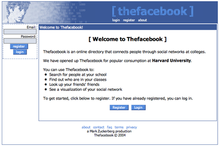
The homepage of Thefacebook on February 12, 2004
In January 2004, the following semester, Zuckerberg began writing code for a new website. He was inspired, he said, by an editorial in The Harvard Crimson about the Facemash incident. "It is clear that the technology needed to create a centralized Website is readily available," the paper observed. "The benefits are many." On February 4, 2004, Zuckerberg launched "Thefacebook", originally located at thefacebook.com. "Everyone’s been talking a lot about a universal face book within Harvard," Zuckerberg told The Harvard Crimson. "I think it’s kind of silly that it would take the University a couple of years to get around to it. I can do it better than they can, and I can do it in a week. "When Mark finished the site, he told a couple of friends. And then one of them suggested putting it on the Kirkland House online mailing list, which was...three hundred people," according to roommate Dustin Moskovitz. "And, once they did that, several dozen people joined, and then they were telling people at the other houses. By the end of the night, we were...actively watching the registration process. Within twenty-four hours, we had somewhere between twelve hundred and fifteen hundred registrants."
Just six days after the site launched, three Harvard seniors, Cameron Winklevoss, Tyler Winklevoss, and Divya Narendra, accused Zuckerberg of intentionally misleading them into believing he would help them build a social network called HarvardConnection.com, while he was instead using their ideas to build a competing product.
The three complained to the Harvard Crimson and the newspaper began an investigation. Zuckerberg used his site, TheFacebook.com, to look up members of the site who identified themselves as members of the Crimson. Then he examined a log of failed logins to see if any of the Crimson members had ever entered an incorrect password into TheFacebook.com. In the cases in which they had entered failed logins, Mark tried to use them to access the Crimson members' Harvard email accounts. He successfully accessed two of them The three later filed a lawsuit against Zuckerberg, later settling.
Membership was initially restricted to students of Harvard College, and within the first month, more than half the undergraduate population at Harvard was registered on the service. Eduardo Saverin (business aspects), Dustin Moskovitz (programmer), Andrew McCollum (graphic artist), and Chris Hughes soon joined Zuckerberg to help promote the website. In March 2004, Facebook expanded to Stanford, Columbia, and Yale. This expansion continued when it opened to all Ivy League and Boston area schools, and gradually most universities in Canada and the United States. Facebook incorporated in the summer of 2004 and the entrepreneur Sean Parker, who had been informally advising Zuckerberg, became the company's president. In June 2004, Facebook moved its base of operations to Palo Alto, California. The company dropped The from its name after purchasing the domain name facebook.com in 2005 for $200,000.

Facebook

Total active users[N 1]
Date↓ Users
(in millions)↓
Days later↓ Monthly growth[N 2]↓
02008-08-26 August 26, 2008 &0000000000000100000000100 &00000000000016650000001,665 178.38%
02009-04-08 April 8, 2009 &0000000000000200000000200 &0000000000000225000000225 13.33%
02009-09-15 September 15, 2009 &0000000000000300000000300 &0000000000000150000000150 10%
02010-02-05 February 5, 2010 &0000000000000400000000400 &0000000000000143000000143 6.99%
02010-07-21 July 21, 2010 &0000000000000500000000500 &0000000000000166000000166 4.52%
02011-01-05 January 5, 2011 &0000000000000600000000600 &0000000000000168000000168 3.57%
02011-07-06 July 6, 2011 &0000000000000750000000750 &0000000000000182000000182 2.54%
On October 1, 2005, Facebook expanded to twenty-one universities in the United Kingdom, the entire Instituto Tecnologico y de Estudios Superiores de Monterrey (ITESM) system in Mexico, the entire University of Puerto Rico network in Puerto Rico, and the whole University of the Virgin Islands network in the U.S. Virgin Islands. Facebook launched a high school version in September 2005, which Zuckerberg called the next logical step. At that time, high school networks required an invitation to join. Facebook later expanded membership eligibility to employees of several companies, including Apple Inc. and Microsoft. On December 11, 2005, universities in Australia and New Zealand were added to the Facebook network, bringing its size to 2,000+ colleges and 25,000 + high schools throughout the United States, Canada, Mexico, the United Kingdom, Australia, New Zealand, and Ireland. Facebook was then opened on September 26, 2006, to everyone of ages 13 and older with a valid e-mail address. In October 2008, Facebook announced that it was to set up its international headquarters in Dublin, Ireland.
Recently[as of?], Facebook.com was the top social network across eight individual markets in the Southeast Asia/Oceania region (Philippines, Australia, Indonesia, Malaysia, Singapore, New Zealand, Hong Kong and Vietnam), while other brands commanded the top positions in certain markets, including Google-owned Orkut in India and Brazil, Mixi.jp in Japan, RenRen in China (where Facebook is currently inaccessible), CyWorld in South Korea and Yahoo!’s Wretch.cc in Taiwan.[citation needed] Additionally, Facebook has become the largest online photo host, being cited by Facebook application and online photo aggregator Pixable as expecting to have 100 billion photos by summer 2011
In 2010 Facebook began to pro-actively involve its users in running the website by inviting them to become beta testers after passing a question-and-answer-based selection process, and also by creating a new section known as Facebook Engineering Puzzles where users would solve computational problems and then potentially be hired by Facebook.

Financials

Facebook's former headquarters in downtown Palo Alto, California.
Facebook received its first investment of US$500,000 in June 2004 from PayPal co-founder Peter Thiel, in exchange for 7% of the company. This was followed a year later by $12.7 million in venture capital from Accel Partners, and then $27.5 million more from Greylock Partners. A leaked cash flow statement showed that during the 2005 fiscal year, Facebook had a net loss of $3.63 million.
With the sale of social networking website MySpace to News Corp on July 19, 2005, rumors surfaced about the possible sale of Facebook to a larger media company. Zuckerberg had already said he did not want to sell the company, and denied rumors to the contrary. On March 28, 2006, BusinessWeek reported that a potential acquisition of Facebook was under negotiation. Facebook reportedly declined an offer of $750 million from an unknown bidder, and it was rumored the asking price rose as high as $2 billion.
In September 2006, serious talks between Facebook and Yahoo! took place concerning acquisition of Facebook, with prices reaching as high as $1 billion. Thiel, by then a board member of Facebook, indicated that Facebook's internal valuation was around $8 billion based on their projected revenues of $1 billion by 2015, comparable to Viacom's MTV brand, a company with a shared target demographic audience.
On July 17, 2007, Zuckerberg said that selling Facebook was unlikely because he wanted to keep it independent, saying "We're not really looking to sell the company... We're not looking to IPO anytime soon. It's just not the core focus of the company." In September 2007, Microsoft approached Facebook, proposing an investment in return for a 5% stake in the company, offering an estimated $300–500 million. That month, other companies, including Google, expressed interest in buying a portion of Facebook.
On October 24, 2007, Microsoft announced that it had purchased a 1.6% share of Facebook for $240 million, giving Facebook a total implied value of around $15 billion. However, Microsoft bought preferred stock that carried special rights, such as "liquidation preferences" that meant Microsoft would get paid before common stockholders if the company is sold. Microsoft's purchase also included rights to place international ads on Facebook. In November 2007, Hong Kong billionaire Li Ka-shing invested $60 million in Facebook.
Entrance to Facebook's current headquarters in the Stanford Research Park, Palo Alto, California.
In August 2008, BusinessWeek reported that private sales by employees, as well as purchases by venture capital firms, had and were being done at share prices that put the company's total valuation at between $3.75 billion and $5 billion. In October 2008, Zuckerberg said "I don't think social networks can be monetized in the same way that search did... In three years from now we have to figure out what the optimum model is. But that is not our primary focus today."
In August 2009, Facebook acquired social media real-time news aggregator FriendFeed, a startup created by the former Google employee and Gmail's first engineer Paul Buchheit who, while at Google, coined the phrase "Don't be evil". In September 2009, Facebook claimed that it had turned cash flow positive for the first time. In February 2010, Facebook acquired Malaysian contact-importing startup Octazen Solutions. On April 2, 2010, Facebook announced acquisition of photo-sharing service called Divvyshot for an undisclosed amount. In June 2010, an online marketplace for trading private company stock reflected a valuation of $11.5 billion.
At the All Things Digital conference in June 2010, Zuckerberg was asked if he expected to remain CEO if the company went public. Zuckerberg said he did, adding that he doesn't "think about going public ... much." He said he did not have a date in mind for a potential IPO.

Notes

  1. ^ An "active user" is defined by Facebook as a user who has visited the website in the last 30 days.
  2. ^ "Monthly growth" is the average percentage growth rate at which the total number of active users grows each month over the specified period.
  3. ^ This value is from an investment document. The date is from when the document was revealed to the public, not the actual date that the website reached this many users.
     
Reference: Wikipedia
Reade more >>

Make money from facebook

0 comments
If you aren’t on Facebook by now, you are probably the only one who isn’t. My grandmother has a Facebook page and anyone who can type, is able to start their own page with no problem. Most everyone uses Facebook as a social meeting place, but did you know that you could easily make money on Facebook as well? I’ve compiled a Top 5 list of the best ways to make a buck on Facebook without leaving your living room:
1. flametunes.com: If you are a musician and would like to sell your music, but don’t have the money for a website or to make top of the CD’s, check out flametunes.com, where you can sell your music from your Facebook profile.
2. buy.com: Garage Sale, in association with buy.com, allows you to sell your unwanted “stuff” to your Facebook friends.
3. Zazzle.com: is one of my favorites! You can create your own products and design your own t-shirts, hats, etc. The cool part is that they walk you through and post your items on their site as well as your Facebook profile.
4. Shopit.com:Sites such as Shopit.com help you easily create your own store, allowing you to sell your old CD’s, electronics, DVD players and more via this simple application.
5. Lemonade.com: allows you to pick items from a selection of sites, add the icon to your profile and sell it for a commission.
Reade more >>

How to hack facebook account, video clips

0 comments
Facebook hack video. In this video, help you just how to hack your friend facebook account. Note: It's just for fun, or for know, please, don't use this illigaly. For more, please, put a comment.
Reade more >>

9 Best Ways to Increase Facebook Fans

0 comments
Everyone wants more Facebook fans, it’s not much fun to have a page with only a few friends. Getting Facebook fans isn’t always easy though. Here are a few tricks to increase your Facebook fans.
Increase Facebook Fans
1. Engage with your fans
You can engage with your fans by responding to their comments, posting about things they like, posting about causes you are involved with, posting contest information or having your own contest, and even offering special discounts or offers only for your Facebook fans. Every time your fans comment or like what you have posted, their networks become aware of you. This can lead to an increase in your fan base.
2. Be consistent
Being consistent is probably the best way to get more exposure and build your brand. Be consistent in posting, responding to posts, asking for help and sharing relevant content.
3. Add to your e-mail signature
Use your e-mail signature to send the information about your Facebook page. This way you will reaching your clients and customers, and their clients and customers with your Facebook information every time you send an email message. This will lead to increased promotion without any extra effort.
4. Post a link on a Facebook wall
This is a very simple process of adding your fan page link using an @ tag, that will help you post a link to a profile wall every time you post something.
5. Pictures
Pictures speak louder than words. They also can generate a second look for your fan page. Use pictures in your welcome page, but make sure that they are optimized.
6. Provide high quality updates
When you provide high quality, informative updates on your Facebook page, people will respond. This will lead to exposure of your fan page to your commenter’s friends.
7. Reach out to people with a direct interest in the company you are promoting
Have people with a direct interest in the company your are trying to build, invite their friends. If each person invites 100 people, you should see 20 people respond.
8. Post the fan box on your website
Post it on every page, your blog and on twitter accounts. This is the best way to get friends that are already excited about what your business is doing. Add your fan page URL to your newsletters as well.
9. Use applications to help spread awareness of your brand
A favorite is the poll application, which allows you to create funny and interesting polls for your followers to participate in. The more interesting the poll, the more people you will involve.
Remember, you learn the most by actually doing. Try out these tips to see what works for you. The more time you spend on your fan page, the more you will engaged your fans will become.
Reade more >>

PROS WAR – Can FaceBook beat Google

0 comments
Google and Facebook are one of the top most used sites these days on the internet world. A normal internet user have no interest in this regard, but as a webmaster we are always curious that can Facebook beat Google as its growing very fast.
Can Facebook beat Google
Facebook is basically a social network which keep changing their features time by time, and people usually stay more on social networks as compare to a Search Engine (Google).
Where as Google is Search Engine Platform, which is #1 used site in the world, people use to find the things of their interest, still Google is on the top and used by more people then FaceBook icon razz
But this war is going on and don’t know who will win. Another thing we need to think that many normal user have Google as their home page, but on other hand FaceBook is home page of very rare people.
Another point: Google is open source search engine, on which you don’t need to sign up, you just have to type and hit enter to use Google, where as FaceBook need sign to use it, like you need to signup to make friends, send messages or to use any other feature of FaceBook , its must to signup.
When I went to streets and colleges I heard many people saying Google it, means Google is very common is use, also as Google is helpful in finding useful information so teachers and parents always recommend to use, where as FaceBook is social network teacher and parent may not be happy if their children use it.
I would just simply like to say that Google is still #1 because its more informative and useful, as we are webmasters also we should love Google more because of their interesting features like Google AdSense, WebMaster Tools etc
Reade more >>

How to Market Your Local Business on Facebook

0 comments
First off, I just want to say that I am not an expert at Facebook and don’t want to induce you to go spend all your marketing budget on Facebook Ads.  This is also a beginners guide to local advertising on Facebook.  I do however think that it is a great way to drive local people to your local business.  Facebook is nearing 600 Million people that have joined their site.  If you aren’t looking at Facebook as a major source of potential traffic then you are missing out on millions of people that could be making your money.  Last year Facebook passed Google as the biggest traffic source in the US.  They now dominate them by over 15 Million people a month as you can see by the image below by Compete.  They are getting huge numbers.  So what’s so great about this?  Facebook has mad an advertising platform where you can target only local people.  They target people down to your local city.  You can target and only pay for a couple hundred people.  You can target them by their interests, hobbies, likes.  Pretty much anything.
facebook vs google e1296107543301
Facebook vs Google Website Visitors Jan 2011
How can my local business make money through Facebook?
How much money are you spending on local mailers?  How much on putting ads in your local Yellow Pages or Newspaper.  Think if you could only target people in your local area how much that could help you.  You can do that with Facebook Ads.  Keep in mind that $.34 is the lowest that Facebook will ever take on a CPC campaign, if you are doing local stuff it’s going to be a bit more.  I would say around $.76 per click in the US.  Driving targeted people to your business can help you to get more people buying your product, you’ll get more sales, and people will know all about your business.  Facebook is great for targeting local people!
Steps to setting up my local business on Facebook:
First thing you will need is a Facebook account.  To do this you will need to go to Facebook and set one up.  Once you have set that up you will go to the bottom of the page where you will click on advertising or the following link. Click on Create an Ad.
Screen shot 2011 01 26 at 11.14.08 AM e1296107599745
Create a Facebook Ad
Next you will begin to set up your Facebook ad.  It’s very important when you select the text that you follow the Facebook Guidelines.  Make sure that you test the content that you are putting in there.  If you are trying to drive people to your local car dealership, you don’t want to put information that doesn’t relate to you.  Put information that people will be excited about and cause them to click.
Tips for a better conversion her would be to ask a question.  You will see a 40% increase in conversion if you do this.  Also, the picture that you use is very important.  Sex Sells, we all know it.  Using a sexy picture of a female will always convert better than a male.  Add boobs to the equation and you will get even more.  In a study by Jeremy Shoemaker “Shoemoney” he found that people are 70% more likely to click on a picture with very attractive woman showing boobs than a man.  Don’t get me wrong, I’m not saying that you should have a woman with everything hanging out on your ad but remember that sex sells.  you will have to weigh this with what kind of an image your local business wants to have online.  Sometimes it’s not worth it.
Do not run multiple versions of the same ad at the same time to see which one is converting the best.  Run one of the local advertising long enough to get some data.  Then run the other ones.  Then figure out which one of the two or three converts best and then switch the ad to the one that wins.  I’m guessing that the same person that clicks on one of your ads will click on another ad and that’s not what we want.  Facebook tells us that people that click on whatever ad won’t be shown the same ad again but I have proved that wrong over and over again.
Screen shot 2011 01 26 at 11.14.53 AM e1296107652778
Local Advertising Targeting Options on Facebook
Now that you have put your ad together for your local business you will need to target  your future customers.  With Facebook, local advertising is made very easy.  You can select where you would like to show the ad.  You can even specifically target only local people in your small city of 200 people. You can target people by:
  • Location – the city, state, province, or country that they live in
  • Demographics – by age range, gender or a specific language that they speak
  • Likes and interests – What are your customers’ hobbies or passions? Unlike search advertising where you target the words people search for, on Facebook you can target people by their interests. For example, if you sell cameras, you could specify that you want your ad displayed to people interested in photography.
  • Education and work – you can direct your campaign to students in a specific college or people with a particular level of education.
Do you even know who to target for your ad?  A great way to find out more about yourself is to go to Quantcast and figure it out.. This is the quick and easiest way to figure out what demographic will be your best bet.  Knowing this can save you tons of time and money.  Using Quantcast you’ll see an index number next to each website stat. The index number is comparing it with other websites on the internet. Anything over 100 is above average for that demographic, under 100 is below average.  Another valuable resource is Google AdPlanner although it’s very complicated and will take a while to learn.
All of these targeting preferences will take down a counter on the right hand side of your screen.  It will tell you exactly how many people will see your ads.  For the best impact you should target your local ad to a small, focused audience.  Make sure that the ad is targeted to a large enough group that you can actually see results.
Choosing how much you pay is the next task.  I always recommend for local guys that you should ALWAYS start with PPC. Test your ad out and make sure it’s converting.  They also offer CPM marketing.  Facebook is trying to maximize revenue so you need to be careful of CPM marketing. If Facebook can get an advertiser to promise to pay a set dollar amount regardless of clicks for 1000 impressions, they reduce the majority of their own risk. What does this mean for you?  It means that if you have a good ad that is converting well,  you should consider switching to CPM advertising.
Setting a daily budget next.  Don’t overdue it, but don’t spend so little that you never give yourself time to get results. Local marketing on Facebook takes time and patience.  I would start off with $10-$20 a day.  That should give you around 15-20 clicks a day.  Facebook with give you what they think should be your max bid for a click.  I usually take what they give me.  Keep in mind, they won’t go below $.34 per click for anything, that’s like their break even.
Tips to making your Local Facebook Ads work
Don’t drive people to your main page of your website, it’s tacky and won’t convert near what even a crappy landing page would convert.  Design a landing page that has a specific action on the page.  If you want someone to fill out a form, have that be the only thing on the page for the to actually do.  I see so many landing pages with so much clutter and links to other things.  Drive people to a landing page with only a form.  Take off all the social media clutter, get rid of it.  Have all the links you want on the “Thanks You” page, but don’t have it on the landing page.  Have your landing page match your copy and picture on your Facebook ad.  This will cause people to recognize what they are looking at and lower a barrier between you and your goal!
Local ads get approved fast, almost all local ads will be instantly approved with Facebook.  This is a really good things because if you are doing a national or world ad it can take a day or two to get approved.  Stick to local and you’ll get ads approved fast.
Change ads every couple weeks.  This will help revamp your CTR (click through ratio) which will help people come to your website.  No one like staring at the same ad for months and months at a time.  They like to see new things, you never know if you change something up if it will spark new interest.  Try adding boarders, putting in new content, and new images.  This will help improve CTR over the long run
Don’t read into the numbers too fast, give yourself some data to work with.  If an ad isn’t converting, change things up a little bit until you find something that works well and gets you the results you want.  Local advertising will take time to figure out.  Facebook is a great place to find local people that are interested in your business.  They just may not know it yet!
Reade more >>

4 Viral Facebook Strategies You Must Use On Your Blog

0 comments
There is no doubt about it, Facebook is becoming one of the key trends in the internet marketing and blogging communities. However, how many of us really know how to use it effectively?
First of all, let me say that I am in no way a Facebook expert. In fact, the social network itself is still relatively new and is growing and changing so fast that I doubt anyone can really be considered a true authority on the subject.
That said, I’d like to share with you 4 Facebook strategies that an increasing number of high profile bloggers are using to great effect…
Facebook Share 2 Credits

1. Like/Share Button On All Posts

This first strategy is really a no-brainer and can be accomplished in a matter of minutes with one of the various free plugins that are available from the WordPress library. Personally, I use Digg Digg (by Yong Mook Kim) on my blog which allows various social media icons to be added in strategic places in your posts. Enough said…

2. Add Facebook Share To Your Thank You Page

Firstly, I hope that you have an email opt-in form and that you are actively building an email list on your blog? If not then it is highly advisable that you do this. Even if you’re unfortunate enough to experience a “Google Slap” in the future, with an email list you can still reach your audience.
Ok, lecture over!
After visitors sign up for your free gift or newsletter they get sent to what is known as a “thank you” page which asks them to confirm their email address. Usually, this simply contains a link back to your main site, but with Facebook you have the opportunity to send your subscriber list viral!
This can be achieved by offering a free gift, for example an ebook or video, on your thank you page in return for the visitor pressing a Facebook Share button. Each time the button is clicked the person’s Facebook friends are alerted and consequently more people are likely to visit your blog.
Clearly, if you’re free gifts are enticing enough then it is possible for your opt-ins (and blog traffic) to go viral here as more and more people go through this process! There are a number of pieces of software that you can install to do this, one of which is Cloud Flood which was created by Glen Allsopp of ViperChill.

3. Encourage Readers To Like/Share

One thing I’ve been guilty of in the past is not actually engaging with my audience enough. This is especially important when it comes to making that all important call to action at the end of your post.
Just as it is a great idea to encourage your readers to leave comments on your posts, it is also vital that you promote your Like and Share buttons with statements such as “If you enjoyed this post then click the Like/Share button to let me know!”.

4. Add Like Enticement To Your Facebook Landing Page

This is a similar concept to the thank you page strategy above. However, this time the action all takes place on Facebook itself. It is a simple task to set up a Facebook landing page – the place where people arrive at when they visit your Facebook page – which offers a free gift (possibly the same one that is offered on your thank you page!) in return for clicking Like.

Conclusion

The great thing about all these strategies is that once they are in place on your blog the positive effects that occur are only likely to increase going forward as Facebook grows towards 1 billion users (perhaps in 2011?) and the network of friends between users becomes more developed.
Reade more >>

Import Facebook Contact Emails Into Yahoo Mail And Gmail

0 comments
mport Facebook Contact Emails Into Yahoo Mail And Gmail
Not many people know that you can import Facebook contact emails and save them to your computer. In fact people don’t even realize that when you sign up a Facebook, your e-mail is available to anyone that you become a friend to. I know myself, that I was not aware, that anonymous people that you have befriended can obtain your e-mail address. I presumed, just like anyone else would, that their only means of contact was through Facebook itself. This is not true. Hopefully this tutorial will make you think twice before pressing the ad as a friend button in Facebook. Below I will show you how easy it is to import Facebook contact emails to your computer.
This is a great thing if you have lost or your “real friends” contact emails as you can get a copy of them from Facebook. On the other hand, if you are just becoming peoples friends in order to sell something to them, then I do not agree that you should be importing their e-mail addresses.

How to import Facebook contact emails into Yahoo mail?

1.  Sign in to your e-mail account at Yahoo! If you do not have an account simply sign up for one, it is free.
2.  In the left column press on contacts.
3.  There may also be a contacts tab at the top of the page. Click on this and it will do the same thing. Please see the screen shot below, double-click on it to make it bigger.
Import Facebook Contact Emails
4.  Look for the section that says import your contacts from other accounts to Yahoo!. click on the link that says import now.In the screenshot above there is an arrow pointing to this section.
5.  Once you have clicked on this link, you will have a choice of accounts to import Facebook contact emails from.
6.  In this tutorial we are going to import Facebook contact emails, therefore we are going to click on the Facebook icon. See the screen shot below.
import Facebook contact emails
7.  If you are signed into Facebook you will see something that looks like the screenshot below. All you have to do is press okay to allow Yahoo to import Facebook contact e-mails.
8.  If you are not signed in, you will be asked to do so, and then you will see the screen.
import Facebook emails
Reade more >>

Create A Facebook Business Page 10 Top Tips

0 comments
I could not believe my eyes when I recently checked my stats for my website and realized how much traffic was coming from my Facebook business page.  I have been promoting my Facebook business page, or maybe I have just been making use of it. It is quite simple really, I have been promoting every article that I publish my website, not only on my Facebook page, but on other peoples as well.
the reason I just started to do this now after three years of having websites for a business, is because I researched my stats and also discovered that Facebook traffic equals income from my website. This means that they are actually bringing money into my business, not one of the top money earners, it possibly could be in the future though.
I have had my Facebook business page for a long time, and left the to its own devices by using auto update programs to enter in a new status each time I post an article on my blog. I thought this method would be enough, but when I started actually using my Facebook business page, I realized that it could give me so much more.

10 tips for making the best Facebook business page

1. Naming your page

Create your Facebook business page using keywords from your website or business. It is important to use keywords in everything you do, as when people are searching, every little bit helps. You also want people to know what your page is about when they land on it. Do not think of some fancy name and let people wonder what the hell the page is about?
Watch this YouTube video on how to create a Facebook page.

2. Facebook business page promotion

Grab a badge or a link to promote your Facebook business page to your customers and fans.you can choose a simple link or a massive box showing all your fans on it. In the screen shot below it shows a picture of my Facebook like box that I have placed on my website. I simply pasted the code that I got from Facebook into a text widget and placed it into the side bar on the right. Make sure you go and press the like button!
Facebook business page – add a like box
Watch this video on how to place a Facebook like box on your website. To find your Facebook page, the directions have changed, as a Facebook website has changed. Go to your account in the top right corner and press on the drop-down Arrow next to it. Then choose manage pages from the menu.

3. Customize your Facebook business page

Make sure you investigate how your Facebook business page looks before inviting your new friends and visitors. Check out every Up the top to make sure there is content on it. This is just the professional thing to do.

4. Branding your page

Many people do not use the Facebook page to its full potential. They simply throw up a small picture as the profile picture and think that this is enough to attract new fans.I like to create a 200×600 pixel branding banner for the side bar of my Facebook business page. This takes up a lot of space and looks great! It is like being offered space in a newspaper and only taking up not even a quarter of it. Why would anyone do that?

5. Spreading the word

Even though you have added badges and links to your website, what about everywhere else? Add a link to your Facebook page in your e-mail signatures,correspondence, business cards, and anything you can think of. Most profiles on websites let you connect into your Facebook account. For example most forums now days, allow you to have your own little Facebook icon under your name. Therefore each post you make has a link to your Facebook page.

6. Update your Facebook page

Post news and new blog posts to your Facebook page status. I do not like using auto posting status updates as it does not allow you to customize it and put your say with it. Also if you personally do it you will probably encourage more conversations between the visitors. Do not only post content from only your website; update your status with any great content you think your readers will enjoy.

7. Facebook page options

Most people forget to set their Facebook page options up correctly. You need to set options such as if people can post on your wall or not, what page a new visitor lands on, and who can see your updates. If you do not know how to get to the settings for your Facebook page, watch the video in number eight and it will show you a few things.

8. Add a custom made landing page

Make your own customized Facebook landing page where you can put images, videos, and even an opt in form. It is just like a website page and it is great for branding and advertising your business. some people add in actions for people to do. For example a number one action would be to press the like button above to join the page, the next action would be to sign up for a newsletter, and maybe another action could be to download a free report.
Reade more >>

Disable Facial Recognition in Facebook Facebook

0 comments
I had recently written an article regarding the facial recognition feature on Facebook. The facial recognition feature was recently introduced by Facebook on its website. While some of us who have a habit of uploading lots of images of friends and families will find this feature a relief but some of us will find it more of a headache.
Facebook facial recognition feature is enabled by default and this feature tells you the name of the person simply by recognizing the face of the person. If you had tagged the person earlier a few times and let Facebook remember the pictures and images of that person, then the facial recognition software automatically picks up the person and shows the person’s name to be tagged. This feature saves a lot of time spent while you need to type in the name of the person to be tagged. For people who like to tag lots of friends and family members, it is good for them as they have to do less work now.
On the contrary, for people like by brother who tags very less images it becomes an irritating feature. However, if you are also one like my brother, then here we have a solution for you. Just follow the instructions below and you can easily disable the facial recognition feature.
  • Go to the Privacy Settings under Account


Facial Recognition
  • Here, you will find the customize settings button, click it.
  • Scroll down a bit on the next page and come to “things others share” and you will see “suggest photos of me to friends” and here click on the edit settings button.
  • You will see that it is enabled by default and if you want to disable it, just click on to the disable button and your job is done.
Facial Recognition
I would recommend that even if you don’t want to disable this facial recognition feature then also you should try it out.
Reade more >>

HP touchpad getting preloaded with Facebook Application

0 comments
After long waiting time, finally official Facebook application is going to get launched with HP Touchpad. Everyone was waiting for the official launching of the Facebook application and finally it is done with HP’s touchpad. Such an Official application of Facebook was not even appeared on iPad, although Facebook was working hard on iPad’s application.
The official application of Facebook with HP’s touchpad will run on WEB OS bought with palm. News also came into existence that Apple will also launch its official App this week. However HP will become the first one to do so.
Everyone might be thinking that how it is possible that Apple will be going to launch its application while there was ongoing dispute between the two’s. Facebook has also clarified that Facebook application with HP has been made by the HP but not Facebook. Earlier Blackberry has also made an application of Facebook by using its platform; however that was not an official Facebook release.
Facebook application on HP touchpad
Preview of this Facebook application:
On the left side of the application, the main navigations will be messages, news feed, friends, place, photos and events. Although some of the features might get updated. This layout makes better use of images and typography. Another important thing is that news feed can be viewed from stream view and tablet compatible view.
Your Facebook photos will be displayed in tiled format. Profile will also highlight some of your friends Photos. Toggling between the wall, photos and info will be much easier.
If we analyze this leaked picture of Facebook application with HP, then we can conclude that this official application will be really worth of use and will make use of extra-large screen of the touchpad.
Now we can just hope that iPad also comes with this much brilliant features.
Reade more >>

How To Create A Facebook Page That Attracts Millions of Fans

0 comments
Pages Are Profiles for Brands
One of the primary reasons for launching Facebook Pages was that many companies were using user profiles for their companies, in turn violating Facebook’s terms of service. While I’m sure there were many other reasons for launching Pages, the easiest way to understand them is through viewing them as “Profiles for Brands”. This means brand pages can essentially do everything that users can do.
Pages Have Access to Users’ Feeds
This is probably the single most important feature within the new Facebook Pages product. Many in the press have described this as Twitter for Facebook. It’s an accurate description but for those that don’t understand what Twitter is, this makes things more confusing. Essentially when Facebook users become a “fan” of your branded page, they will be notified of your status updates anytime you update the status on your brand page, via the primary news feed on the homepage.
The News Feed is Now Real Time
This is actually an update to the site homepage but it will have a significant impact. Previously Facebook cached the homepage for at least 15 minutes in addition to automatically filtering all feed stories. This means that any feed story which made it to the news feed previously would stay there for a fairly long period of time. The news feed has since been redesigned to stream stories instead displaying the automatically filtered stories as “Highlights” on the right hand side of the page.
Pages Can Integrate Multiple Applications
Earlier this week I posted the example of a robust branded Facebook page which integrates an application into the experience. Pages could previously integrate basic applications but now there is space to integrate applications that are just as robust as those with standalone canvas pages. Not sure of what “canvas pages” are? A canvas page is the space in Facebook below the Facebook header and to the left of Facebook’s sidebar ads. Essentially you can now post applications which take up the full width of the page. I’ve gone ahead and posted a photo of the canvas area in the photo below.
-Facebook Pages Canvas Screenshot-
Brands Can Join the Conversation
Social media has always been about joining the conversation and for the first time ever on Facebook, brands can now be a significant part of the conversation. Just as I mentioned earlier, these conversations can take place within a Facebook Page as well as in a user’s news feed. I can’t emphasize how important joining the conversation is. While your social media strategy should continue to include other outlets (blogs, Twitter, etc), Facebook should now attract much more attention since there is the potential for conversation.

10 Facebook Page Strategies Every Brand Should Know

As I mentioned in the introduction, Facebook Pages present a massive opportunity for brands to directly engage with their existing and future customers, even the occasional passer-by. This conversation brings with it the power that all other social media tools and platforms provide which is why this latest release of Facebook Pages is so important for brands. Yes, changes will come to the Pages product over the coming months and years but as many early adopters know, it’s often best to wait until the second version of a product arrives. Now that the second version of Facebook Pages has launched, it’s time for you to take your brand to the next level.
Below, I have outlined 10 tips for creating engaging Facebook Pages. These are only the top 10 and there are many other lessons to be learned but this should serve as the ultimate starter guide for any brand/company looking to make their entrance into Facebook.

1. Develop Custom Tabs for Custom Ads

-Custom Page Tabs Screenshot-
Advertising your brand’s page is always extremely important. One of the greatest features of Facebook’s new pages product is that you can link directly to specific tabs. That means you can separate which pages a user views by default based on the ad that they clicked on. For example, perhaps you’d like to target two groups of users in different geographic locations. You would display one advertisement for people in Washington, D.C. and those users will land on a page which is specific to users from Washington, D.C. A different page would be displayed to users from San Francisco for example.
While this system isn’t necessarily the most scalable (for example having 500 tabs doesn’t really make much sense), it can instantly increase the conversion of new visitors into fans. This method also requires a bit more investment in customization but I’d argue that it’s well worth it, especially for smaller brands and companies.

2. Don’t Let New Users Land on the Wall

-No Wall Tab Image-
Why on earth would I tell you not to let users land on the wall? Well, my biggest concern is that they’ll bump into humpty dumpty. Seriously though, there is a huge opportunity to present users with engaging information and while the content provided by fans of your brand can be engaging, you have absolutely no control over it. That’s why it’s much better to have new visitors enter a controlled environment and then proceed to navigate through areas with less structure. Yes, the wall can be extremely valuable for letting users talk to you and your brand but such unfiltered waters are the last place you should force a new user to navigate through. Provide your users with a safe entrance to the muddy waters we call “social media” and they will forever thank you for it, trust me.

3. Create a Unique Page Image

-Custom Profile Image- I honestly believe that this is one of the most important components of a fan page. It’s a simple component yet within the confines of a 200 pixel wide box, you would be surprised with the creative ideas that people come up with. Recently Rob Banagale, a guest author on AllFacebook, published an article entitled “5 Creative Ways to Hack Your Facebook Profile Photo“. If you haven’t read it, I suggest you check it out. More impressive than the photos included in the tutorial are the photos that numerous users posted at the end.
I cannot tell you how many standard Facebook Pages I’ve seen in which the basic logo is displayed. If your company has more than one employee (has extra resources), there should be no excuse for not creating an engaging photo for your Facebook Page. It’s one of the first things users look at and it has the potential to leave a lasting impression so make it good!
The photo posted above is a unique user profile photo but I think it illustrates how you can develop creative photos that take advantage of the awkwardly positioned border. If you have other creative profile photos or Page photos that you’ve created or seen please let us know about it.

4. Integrate Applications To Increase Engagement

The last thing you want is for users to land on your Facebook Page and leave immediately. The greatest opportunity you have to capture their attention is through engaging applications. There are currently over 55,000 applications on the Facebook platform and a relatively large portion of them can be directly integrated into your fan page. Over the coming weeks there will be numerous applications that are built around the soon to be updated Facebook Page API which will make it easier for brands to launch a relatively engaging Facebook Page within minutes.
For larger brands I highly recommend that you develop a more robust experience for the user. Games, quizzes, and other types of dynamic content in general can help keep users on your Facebook Page for longer durations of time. As you know, we live in an attention economy and that means you want to get all the attention you can from consumers. One thing you should make sure is that your application has a call to action so that when a new user lands on the page they are immediately engaged.
-Amp Energy Application Screenshot-

5. Join the Conversation, It’s Not Optional Anymore

-Conversation Bubbles Icon- As I stated before, this is the first time that brands have the opportunity to be a major part of a user’s conversation on Facebook so take advantage of it. That means every time someone comments on your new status, a photo, a video, a discussion thread, or anything else, you need to comment on it. Gone are the days of a one-way conversation in which the brands talk down to their customers. We are in the midst of a conversational revolution and your company needs to be part of it. At this point, you don’t have the option not to participate.
Failing to engage your customers and potential customers means less revenue, and it also means you’ll be losing to your competition who is engaging with their customers on a regular basis. Whether you are a small business (dentist, physician, plumber, restaurant, etc) or a large corporation, you need to be talking to your client and the only way to do that is through a two way dialogue. They’ll ask you questions that you can reply to and you can ask questions as well. Ask about what would improve their experience with your company. Also, ask them about the world in general because at the end of the day, they’re humans just like you.
It takes extra effort to engage your clients and going that extra mile will always keep clients coming back. You want to promote an exceptional brand right?

6. Publish Interesting and Relevant Content

Just like in other areas of social media (blogs, Twitter, etc), it’s extremely important to provide interesting content to your readers. Facebook is no different. By regularly referencing other relevant content, your fans will keep returning to your page. While attracting repeat visitors is not the single most important component of fan pages, repeat engagement is easily the second most important variable. In virtual economies, one of the most effective measurements of the state of an economy is repeat usage. Facebook pages and other digital content channels are no different. Users that return to your page regularly are significantly more likely to become paying customers.
Even more important is that existing customers who return to your Facebook page are more likely to continue as customers. The bottom line is that a plain looking Facebook page is not doing your company any favors. Yes, having any sort of presence is always better than nothing at all but if you took the time to read through this guide, please do me a favor and make a little extra effort to create an engaging Facebook page. So how do you find interesting content?
While I won’t dive to deep into the details about finding interesting content, you should be able to find relevant content to your readers by doing a search on Google Blogsearch, and leveraging an RSS reader like Google Reader. Typically I would assume that most readers of this site know what RSS is but if you don’t it’s a simple way to read the content on sites without actually having to visit each site individually. If you want to learn more, check out Google’s Feed 101. If you want the short answer for finding interesting content: look for it. I wish I could say it’s easier than that but unfortunately it still takes time to find interesting content.
You can turn to other forms of content aggregators like Delicious.com and Digg.com but those typically only serve specific communities. If you are outside of the new media industry, you’ll have to use traditional sources like Google News, Google Blogsearch, and the mainstream media.

7. Repost Comments By Other Users

If you are on Twitter, reposting information is essentially the same as a retweet. By reposting a person’s information, you are complimenting them and they will be more likely to pay attention to you. I should note that I’m using “you” and “your brand” interchangeably in this part because in social media, you should be placing a face on your brand. Right now Fan Pages aren’t extremely conducive to putting a face on the brand but that will change overtime. Reposting the information that other users post is extremely valuable.
Don’t overuse this though! I can’t tell you how often I see people on Twitter retweet other users continuously, hoping that it will suddenly increase their follower base drastically. While it will help, this is not something which should suddenly drive thousands of users to your fan page. Instead, it’s a good habit to get into as overtime you and your company’s reputation will build for engaging users on a regular basis.

8. Update Regularly!

-Calendar Icon- While it’s extremely important to monitor the conversation that users are having within your branded Facebook Pages, it’s also extremely important to help spark the conversation. By posting questions to users, creating new topics within discussion forums, and performing other activities that create dialogue (such as the previous one mentioned), you’ll keep users coming back to your Facebook Page. This is similar to the concept of posting blog posts regularly (which by the way can be automatically imported to your Facebook Page) on your company blog.
Just as I’ve emphasized the importance of quality content and engagement with your fans, the most important thing is persistence. Unless you keep engaging your fans on a regular basis and continue to post interesting content, you are going to find it difficult to continuously attract new fans.

9. Post and Tag Users in Photos and Videos

-Facebook Photo Tagging- Tagging users in photos and videos is probably one of the most effective promotional activities that you can do. The only challenge is coming up with content to tag users in. The best way to get photos and videos of your fans is through hosting events as I mention in the next tip but if you can’t host events, you’ll need to come up with creative ways to tag your fans. So how do you do that? That’s a bit more complicated but nothing that a creative marketer can’t figure.
One way would be to introduce a contest to your fan page and then tag the winners of those awards in a trophy photo. If you want to take that idea a step further you could actually integrate your fans’ photos into the trophies. This is just one idea though and there are a limitless number of ideas out there. Tagging users is a naturally viral process because as soon as you tag one person, their friends see it and then users are driven to that album which in this case, resides within your fan page.
There is one extremely limiting factor about fan page photos though: you must be a friend of a user to tag them! Yes, it’s unfortunate and honestly I don’t think it makes much sense. While Facebook should enable fan pages to tag members of the page, they haven’t done so yet. Theoretically I could suggest leveraging “guerilla tactics” or overly aggressive techniques to tag members. What are these “guerilla tactics” that I speak of? Well you can figure it out on your own but one example would be adding a fan as a friend for the sole purpose of tagging them in a photo.
I don’t recommend using this technique or any technique similar to this though because you may end up in Facebook jail (a.k.a. getting banned from the site). For the time being I would recommend posting as many relevant photos as possible and tagging those users that are in them. The more tagging that takes place, the quicker your page will spread.

10. Leverage the Power of Facebook Events

-Facebook Events Icon-Events provide an amazing opportunity for brands to reach out to their fan base. Best of all, these events don’t actually need to be in person events! While it’s not possible to view the network density of the fans of your brand (you can’t easily see how many fans are friends with each other), when multiple people RSVP to an event there are increased odds that your event will be distributed through the social graph, in turn driving new users to your brand’s page.
Like previous tricks or tips that I mentioned, there are inherent limitations. The primary one being that messages sent out to an event created through a fan page do not end up in a user’s inbox. Instead, those messages are sent via page “updates” which are displayed in a separate area. Fortunately, Facebook’s redesigned homepage, which is launching this week, includes updates at the top of a user’s homepage, making them more visible.

So Where Are My Millions Of Fans?

-Crowd of Fans-I know that I started this article by suggesting that you could attract millions of users to your Facebook fan page. I firmly believe that it is possible but it will take a lot of effort. Putting forth that effort though can produce substantial rewards. I’ve only touched on ten strategies that can be used to drive new fans to your page but ultimately, the more time you invest in your brand’s Facebook page, the better response you’ll get.
Yes, you could choose to simply set up a page and let it stand there because your brand alone can attract hundreds of thousands if not millions of users. If you’ve read this far in the guide though, I’m guessing your brand alone will not cut it. Instead, through persistence and consistent attention to your branded page, you will be able to generate new customers and retain existing ones. No, a Facebook page should not be the end of your company’s social media strategy but with 180 million or more Facebook users and millions more joining every week, there is no excuse not to be on the site.
But Nick, you told us that we’d have millions of fans though and that’s why I read this article. Yes, I did! There are many more techniques to improve the rate at which fans return to your Facebook page and I am glad to share those with you. If you want to have access to them, you are going to have to sign up for our newsletter though. I know, I teased you with all these tips, but honestly this should be enough to get you started. If you have any tips that you’d like to share us with please do and we’ll share it with the community.
Reade more >>
 

Copyright 2009-2012. All Rights Reserved by Talkfromnet.blogspot.com...About Author: MHSHOHEL